

Scheduling's Next Leap: AI Takes Hold
For years, scheduling has been a necessary evil. Back-and-forth emails trying to find a mutually agreeable time, the constant threat of double-booking, and the general inefficiency of manually allocating time – it’s a process most of us dread. Now, things are changing. Artificial intelligence is stepping into the calendar space, promising to transform how we manage our time and, ultimately, our lives.
This isn’t simply about automating existing processes, though automation is a part of it. What’s really exciting is the potential for intelligent assistance. AI can analyze your habits, understand your priorities, and proactively suggest the best way to structure your day. It’s about moving from reactive scheduling – responding to requests – to proactive time management.
The tools emerging now aren’t just digital calendars; they’re personal time management assistants. They’re learning our work patterns, respecting our need for focus, and helping us reclaim control over our most valuable resource: time. We’re at the beginning of a significant shift, and the impact will be felt across personal and professional spheres.
The frustration of endless email chains, the cognitive load of constantly juggling appointments, and the feeling of being perpetually behind are all issues AI-powered calendar management aims to solve. It’s a response to the increasing demands on our time and a recognition that traditional methods simply aren’t cutting it anymore.
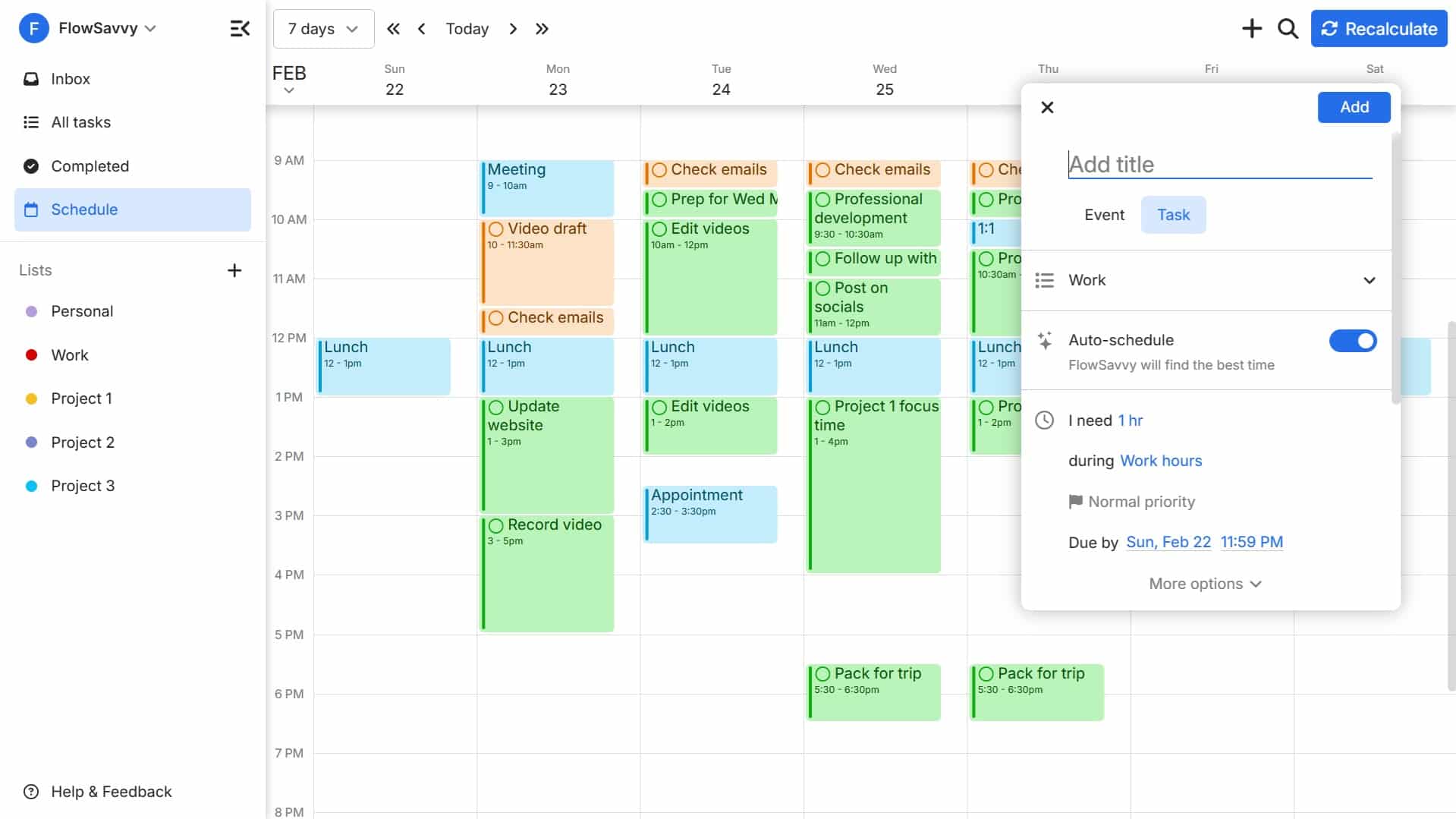
Reclaim.ai and the Rise of Time Blocking
Reclaim.ai is a prime example of how AI is being used to revolutionize time management. It’s built around the concept of time blocking – a technique where you schedule specific blocks of time for specific tasks. But unlike manually creating these blocks, Reclaim.ai automates the process, learning your habits and priorities to intelligently allocate time for you.
The core of Reclaim.ai is its ability to connect to your existing calendars – Google Calendar, Outlook, and others – and analyze your schedule. You tell it about your recurring commitments, like meetings and work hours, and then you input your habits and tasks, such as 'exercise,' 'writing,' or 'project X.' Reclaim.ai then automatically finds the best times to block off for these activities, respecting your existing commitments and preferences.
What sets Reclaim.ai apart is its "Smart Meetings’ feature. It doesn’t just find a time when everyone is available; it considers factors like attendee work styles, travel time, and even preferred meeting lengths. This goes beyond simple scheduling; it’s about optimizing meetings for maximum productivity. It"s a significant step up from tools that simply present a list of available slots.
Reclaim.ai isn’t just a scheduling tool; it’s a proactive time manager. It continuously learns from your behavior, adjusting its suggestions over time to better align with your needs. This is a key difference from reactive schedulers that only respond to requests. It anticipates your needs and plans accordingly. The platform offers pricing plans starting around $12 per month, scaling with the number of connected calendars and advanced features.
- Connect your calendars (Google, Outlook, etc.).
- Input your habits and tasks (e.g., 'exercise', 'focused work').
- Reclaim.ai automatically blocks time for these activities.
- Utilize 'Smart Meetings' to optimize meeting scheduling.
Meeting Optimization: Beyond Simple Scheduling
The benefits of AI-powered calendar management extend far beyond simply finding a free slot on the calendar. Many tools are now incorporating features designed to optimize meetings themselves, making them more productive and less draining. This includes automatic agenda creation, AI-powered transcription, and intelligent follow-up task assignment.
For example, some platforms are now able to analyze meeting invites and automatically generate a draft agenda based on the topic and attendees. Others use AI to transcribe meetings in real-time, creating a searchable record of the discussion. This is incredibly valuable for those who missed the meeting or need to revisit specific points. Reclaim.ai also integrates with tools to provide meeting summaries.
Following the meeting, AI can assist with task assignment. By analyzing the discussion, the AI can identify action items and automatically assign them to the appropriate individuals. This eliminates the need for manual note-taking and ensures that nothing falls through the cracks. This is a huge time saver and a significant contributor to overall project efficiency.
While Reclaim.ai is a strong contender in this space, other platforms like Otter.ai and Fireflies.ai specialize in meeting transcription and summarization, and can integrate with existing calendar tools. The goal is consistent: to reduce 'meeting fatigue' and improve the effectiveness of every interaction. This is where the real value of AI in scheduling begins to emerge.
- Automatic agenda creation
- AI-powered meeting transcription
- Intelligent follow-up task assignment
- Meeting summarization
Smart Scheduling Links: The End of Email Tag?
One of the most significant time-savers offered by AI-powered calendar tools is the concept of smart scheduling links. These links allow people to book appointments with you directly, within your pre-defined availability, eliminating the endless back-and-forth of "What time works for you?" email chains.
Instead of manually suggesting times, you simply share a link, and the other person can view your availability and select a slot that works for them. The system automatically checks for conflicts and confirms the appointment. This is a game-changer for anyone who spends a significant amount of time scheduling meetings.
The power of smart scheduling links lies in their customization options. You can set buffer times between appointments to allow for preparation or travel, specify location preferences (in-person, virtual, or both), and require specific information from the person booking the appointment. Reclaim.ai allows for detailed customization of scheduling links.
This isn’t just about convenience; it’s about creating a better user experience. It’s about respecting both your time and the time of the person you’re meeting with. It’s about streamlining a process that has traditionally been clunky and inefficient. The time savings are substantial, and the improved experience can leave a positive impression.
AI and Calendar Sync: A Seamless Experience
In today’s world, most people use multiple calendars – a work calendar, a personal calendar, perhaps a shared family calendar. Keeping these calendars synchronized can be a nightmare, leading to missed appointments and double-bookings. AI is helping to resolve these issues and create a more seamless experience.
AI-powered calendar tools are able to intelligently resolve conflicts between calendars, prioritizing events based on your preferences. They can also learn your usage patterns and proactively identify potential syncing issues before they happen. This is a significant improvement over traditional syncing methods, which often rely on simple rules and can be prone to errors.
Tools like Reclaim.ai and others are becoming adept at handling complex syncing scenarios, such as multiple calendars, shared calendars, and different time zones. They can automatically adjust event times to account for time zone differences and ensure that everyone is on the same page. This is particularly valuable for teams that are distributed across different locations.
While predicting syncing issues is a developing area, the ability of AI to learn user behavior and identify anomalies suggests that it will become increasingly accurate in anticipating and preventing conflicts. The goal is to create a truly unified calendar experience, where all your appointments are seamlessly synchronized across all your devices and platforms.
The Future of Calendar AI: Predictions for 2026
Looking ahead to 2026, the future of AI-powered calendar management is incredibly promising. We can expect to see advancements in several key areas, including predictive scheduling, personalized task prioritization, and deeper integration with other productivity tools.
Predictive scheduling, where AI anticipates your needs and proactively blocks off time for tasks, is likely to become more sophisticated. The AI will not only consider your existing commitments but also your work patterns, energy levels, and even external factors like travel schedules and industry events. It will suggest optimal times for focused work, creative brainstorming, and important meetings.
Personalized task prioritization will also become more prevalent. AI will analyze your tasks and prioritize them based on your goals, deadlines, and dependencies. It will then integrate this prioritization into your calendar, ensuring that you’re always working on the most important things. This will go beyond simple to-do lists; it will be a dynamic, AI-driven prioritization system.
Finally, we can expect to see deeper integration with other productivity tools, such as project management software, communication platforms, and note-taking apps. This will create a more holistic workflow, where your calendar is seamlessly connected to all aspects of your work and personal life. The line between calendar, task manager, and project planner will continue to blur.
Top AI Calendar Tools: A Quick Roundup
The market for AI-powered calendar tools is rapidly evolving, with new players emerging all the time. Here’s a quick overview of some of the top contenders as of late 2024/early 2025, focusing on those that genuinely leverage AI.
Reclaim.ai: Remains a leader in the space, offering robust time blocking, smart meetings, and customizable scheduling links. Pricing starts at $12/month. Ideal for individuals and teams looking for a proactive time management solution.
Clockwise: Focuses on optimizing team schedules and minimizing meeting fragmentation. It analyzes team calendars to identify opportunities for consolidation and suggests optimal meeting times. Pricing varies based on team size. It’s a strong choice for organizations looking to improve team productivity.
Motion: Combines calendar scheduling with project management features, allowing you to allocate time for tasks and track progress. It offers a more comprehensive solution for those who want to manage both their time and their projects in one place. Pricing starts around $19/month.
x.ai (Amy/Andrew Ingram): Offers an AI assistant that handles scheduling via email. You simply CC the assistant, and it takes care of the back-and-forth communication. It’s a convenient option for those who prefer a more hands-off approach. Pricing plans are available for individuals and teams.
Doodle: While traditionally a polling tool, Doodle has added AI-powered scheduling features, including suggested meeting times and automated reminders. It’s a good option for those who need to schedule meetings with large groups. Offers both free and paid plans.
SavvyCal: A newer entrant, SavvyCal emphasizes a clean user interface and flexible scheduling options. It offers features like buffer times, round-robin scheduling, and team availability. Pricing starts around $15/month. It’s worth considering for those who prioritize simplicity and customization.
Essential Tools for AI-Powered Productivity

Immersive Spatial Audio · World-Class Noise Cancellation · Up to 30 hours of playtime
These headphones create a focused environment by minimizing distractions, allowing for deeper concentration on tasks and meetings.

Reusable notebook with interchangeable pages · Lined and dotted page options · Cloud integration for digital storage
This smart notebook streamlines the process of capturing meeting notes and ideas, making them easily searchable and accessible alongside your AI-managed schedule.

10,000mAh capacity · PowerIQ charging technology · Compact and travel-ready design
Ensuring your essential devices remain powered throughout the day, this power bank prevents interruptions that could disrupt your AI-optimized workflow.

Ergonomic design for comfort · Ultra-fast scrolling and quiet clicks · 8K DPI tracking on any surface
This advanced mouse enhances productivity with its precision and comfort, complementing the seamless efficiency brought by AI calendar management tools.
As an Amazon Associate I earn from qualifying purchases. Prices may vary.
No comments yet. Be the first to share your thoughts!