

How apple intelligence handles your time
Apple Intelligence, announced recently, represents a significant shift in how we interact with our devices. It’s not simply about faster processing or prettier interfaces; it’s about building systems that anticipate our needs. And while much of the initial discussion revolved around photo editing and text summarization, the implications for calendar management are potentially huge. We’re moving from reactively scheduling – manually adding events and reminders – to a more proactive assistance model where the system understands our commitments and helps us manage them.
The core idea is to leverage on-device processing to personalize the experience. This means Apple Intelligence isn't sending all your data to the cloud, which is a point Apple has emphasized repeatedly. Instead, it learns from your habits and preferences directly on your iPhone, iPad, or Mac. Early demos show a focus on understanding the context of your requests. For example, if you tell Siri 'schedule a meeting with John next week,' Apple Intelligence will pull from your recent communications to suggest optimal times and even potential locations.
A particularly interesting element is the integration of visual intelligence. Apple demonstrated the ability to understand the content of images, and I think this will extend to calendar events. Imagine taking a picture of a concert flyer, and Apple Intelligence automatically creating a calendar entry with the date, time, and location. It's a small thing, but it could save a lot of manual entry. It's still early days, of course, and the full extent of Apple Intelligence’s calendar capabilities remains to be seen. But the initial signs are promising.
Pulling team schedules from the web
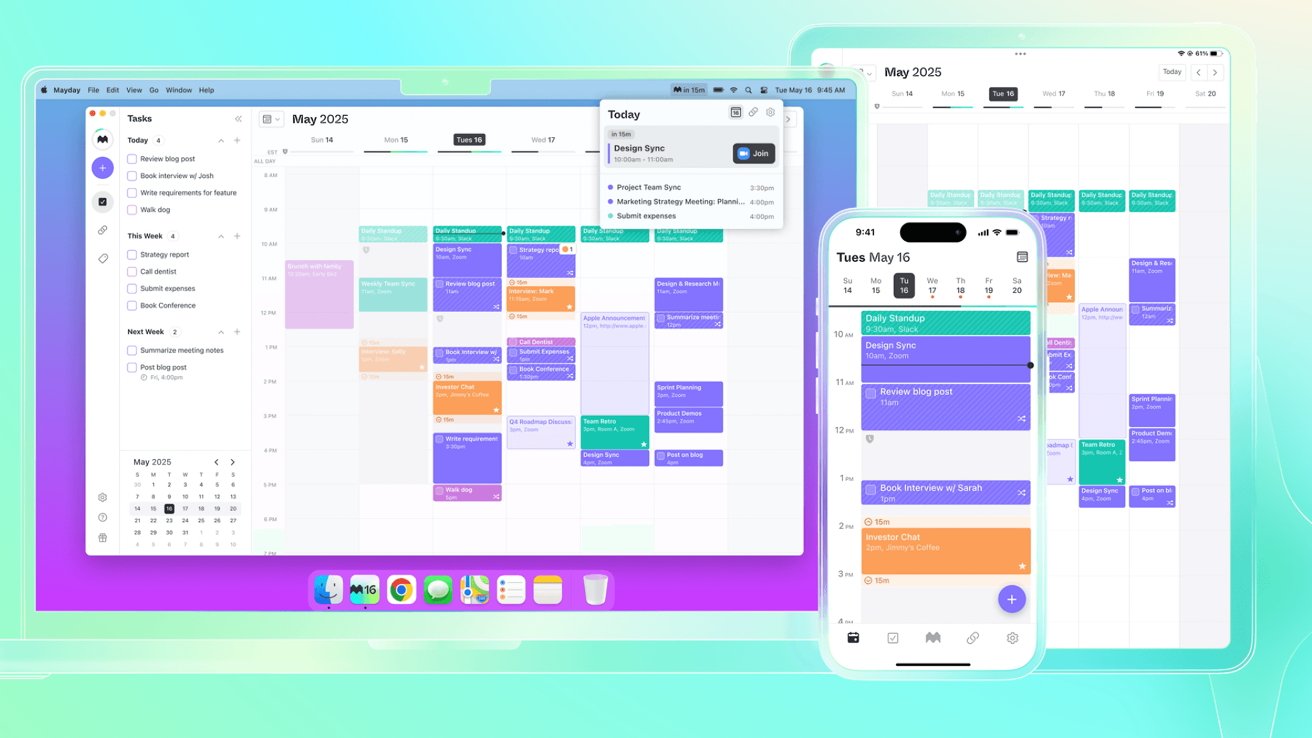
One of the more intriguing reports from Geeky Gadgets details Apple Intelligence’s ability to pull team schedules directly from websites. This goes beyond simply importing an iCalendar file. The system can actually scrape information from websites that publish schedules – think sports teams, school activity calendars, or even project management boards. It then integrates this information into your calendar, complete with details such as time, location, and broadcast links.
How does it work? It’s not entirely clear, and Apple hasn’t released detailed technical specifications yet. But the implication is that Apple Intelligence uses a combination of machine learning and web parsing to identify schedule data on these sites. It needs to be able to handle variations in website structure, which is a significant challenge. Some sites are well-organized, while others are a mess of tables and inconsistent formatting. The success of this feature will depend heavily on Apple's ability to adapt to these differences.
The benefits are obvious for anyone who manages complex, shared schedules. No more manually updating your calendar when a game time changes or a meeting is rescheduled. This feature could be a lifesaver for parents juggling multiple children’s activities, project managers coordinating team deadlines, or sports fans tracking their favorite teams. It’s a practical application of AI that solves a real-world problem. I suspect initial support will be limited to a specific set of popular websites, with broader compatibility coming later.
Linking reminders and events
Apple Intelligence isn’t just about adding new features; it’s also about making existing features work better together. The integration between Apple Intelligence in Reminders and the Calendar app is a prime example. The 'Auto Categorize' feature, detailed on Apple’s support site, automatically sorts related reminders into sections within a list. This means reminders related to specific calendar events will be grouped together, making it easier to stay organized.
For instance, if you have a calendar event for a doctor’s appointment, Apple Intelligence might automatically create reminders to "bring insurance card,’ ‘write down questions,’ and ‘fill out paperwork.’ These reminders would then be grouped under a section labeled ‘Doctor’s Appointment" within your Reminders list. This is a significant improvement over the traditional method of creating individual reminders and manually tagging them.
What sets this apart is the automation. Previously, you’d have to proactively create these reminders and link them to the event. Now, Apple Intelligence does it for you. It’s a subtle but powerful change that can save time and reduce mental clutter. I'm curious to see how well it handles more complex events with multiple preparation steps.
Sharing Calendars: Beyond Basic Invites
Apple already offers robust calendar sharing features. As outlined in Apple Support documentation, you can share individual calendars with specific people, grant different levels of access (view only, edit events), and even create public calendars. But I think Apple Intelligence has the potential to take this functionality to the next level. Right now, sharing is largely a manual process – you decide who to share with and what permissions to grant.
Imagine if Apple Intelligence could suggest appropriate sharing permissions based on the content of the event. For example, if you’re scheduling a meeting with your team, it could automatically suggest sharing the calendar with them and granting them edit access. Or, if you’re planning a family vacation, it could suggest sharing the calendar with family members and granting them view-only access. It could also automatically create group calendars for recurring events, streamlining the process for things like weekly team meetings or monthly book clubs.
However, with increased intelligence comes increased privacy concerns. Apple will need to be careful about how it handles this data and ensure that users have full control over their sharing settings. I suspect we’ll see a strong emphasis on on-device processing to minimize the amount of data sent to the cloud. The balance between convenience and privacy will be a key factor in the success of this feature.
Visual Lookup & Event Details
GeekHampton highlighted Apple Intelligence’s visual intelligence capabilities, and I believe this will be particularly useful for calendar management. The ability to extract event details – time, location, attendees – from images is a game changer. Think about how often you encounter event information in visual formats: screenshots of invitations, photos of flyers, even images shared on social media.
The process would work something like this: you take a picture of the event information, and Apple Intelligence analyzes the image, identifies the relevant details, and prompts you to create a calendar entry. It’s a much faster and more convenient process than manually typing everything in. What types of images will be supported? Screenshots, photos of physical flyers, and even images containing text are all possibilities.
However, accuracy is a major concern. Image quality, lighting conditions, and font styles can all affect the system’s ability to correctly identify the information. I'm not sure how well it will handle handwritten notes or complex layouts. It’s also likely to struggle with images that are poorly cropped or distorted. This feature is still in its early stages of development, and we can expect to see ongoing improvements in accuracy and reliability.
Syncing with Non-Apple Calendars: Still Possible?
For many users, the Apple ecosystem isn’t everything. They rely on Google Calendar, Outlook, or other non-Apple platforms for their scheduling needs. The big question is: will Apple Intelligence features work seamlessly with these calendars? The answer is likely…complicated. iCal compatibility is the key. As long as the non-Apple calendar supports the iCal standard, basic syncing should continue to work.
However, the more advanced Apple Intelligence features – like automatically pulling team schedules from websites or extracting event details from images – may not be available for non-Apple calendars. These features are likely to be deeply integrated with the Apple ecosystem and may require access to Apple’s on-device processing capabilities. There's a real risk of creating a fragmented experience where Apple users have access to a superior set of features.
Third-party integrations will be crucial. If developers can create apps that bridge the gap between Apple Intelligence and other calendar platforms, it could mitigate some of these limitations. But ultimately, the level of integration will depend on Apple’s willingness to open up its APIs and allow third-party access. It’s a situation worth watching closely, especially for users who are invested in multiple calendar ecosystems.
Calendar Feature Comparison with Apple Intelligence Integration (2026)
| Feature | Apple Calendar | Google Calendar | Outlook Calendar |
|---|---|---|---|
| AI-Powered Scheduling Assistance | Strongest - Native integration with Apple ecosystem | Good - Leveraging Gemini AI | Developing - Dependent on Microsoft 365 Copilot |
| Visual Lookup for Events | Better for - Direct integration with iPhone camera and screen for event context | Limited - Requires third-party integrations | No |
| Automatic Event Categorization | Good - Enhanced by Apple Intelligence’s Auto Categorize capabilities | Good - Existing Smart Compose features contribute | Limited - Relies on basic keyword detection |
| Team Schedule Integration | Good - Potential for streamlined integration based on Geeky Gadgets reporting | Good - Integrates with Google Workspace team calendars | Better for - Strong Microsoft Teams integration |
| Contextual Event Summarization | Strong - Apple Intelligence expected to provide detailed summaries | Good - Gemini can summarize event details | Limited - Requires manual summarization or Copilot |
| Cross-Platform Sync Reliability | Best - Optimized for Apple devices, generally reliable across platforms | Good - Widely compatible, occasional sync delays reported | Trade-off - Sync can be inconsistent with non-Microsoft platforms |
| Natural Language Event Creation | Good - Improving with Siri and Apple Intelligence | Strong - Google Assistant integration is well-established | Good - Cortana integration, but less refined |
Qualitative comparison based on the article research brief. Confirm current product details in the official docs before making implementation choices.
The shift toward proactive scheduling
Looking ahead to 2026, I expect calendar management will become even more proactive and AI-powered. We’ll likely see deeper integration between calendars, reminders, and other productivity apps. Apple Intelligence could potentially learn your travel patterns and automatically suggest optimal meeting times based on your location. It might even anticipate potential conflicts and proactively offer solutions.
A key trend will be the move towards contextual awareness. The system won’t just know what events you have scheduled; it will understand why you’re attending them and what you need to prepare. This could lead to personalized recommendations for related tasks, documents, and contacts. We might also see more sophisticated natural language processing, allowing you to interact with your calendar using voice commands.
The system won't be perfect. Privacy remains the biggest hurdle, as Apple has to prove it can handle this much personal data without it leaving the device. If they can't get the on-device processing right, these features will just be another set of tools we eventually turn off.
What calendar feature powered by AI would be most valuable to you?
Vote below and tell us which AI-powered calendar feature would help you manage your schedule more effectively.
No comments yet. Be the first to share your thoughts!